CDR - content disarm & reconstruction
- How it works?
- 1. Deconstruct file
- 2. Analyze file
- 3. Sanitize file
- CDR integration into your infrustructure
- Integration with tLab Mail (MTA)
- Roadmap: Integration with tLab Browser Extension
Content Disarm and Reconstruction (CDR) is a technology designed to protect systems from file-based threats by neutralizing potentially malicious content. CDR processes incoming files by disassembling them, removing or sanitizing risky elements (such as macros, scripts, embedded objects, or external links), and reconstructing the files into a safe, functional format. This ensures that the sanitized files remain usable while eliminating hidden threats, including zero-day exploits, without relying solely on signature-based detection.
How it works?
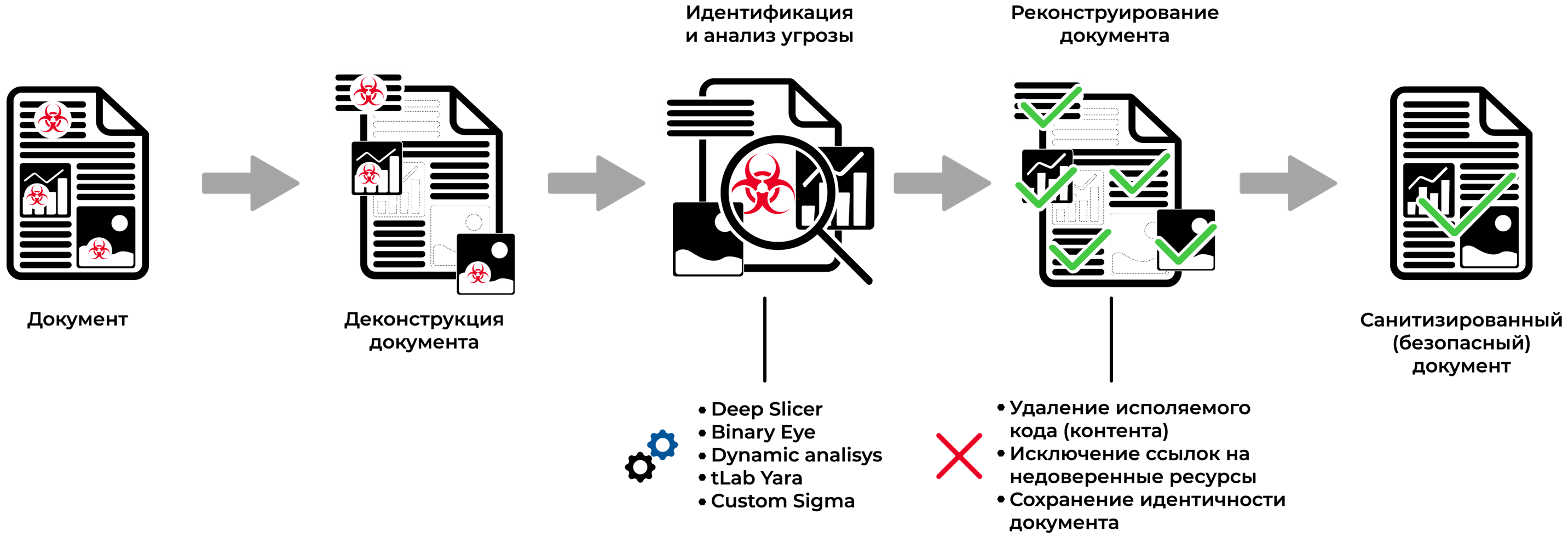
CDR process works in the following steps:
1. Deconstruct file
Each file is deconstructed into components like DDE, CustomUI, macros, hyperlinks, OLE objects, and other internal or external elements. This granular approach allows precise analysis of each object for malicious content, enhancing security by neutralizing hidden threats missed by traditional detection methods.
CDR is integrated with Static analyzer module which allows verifying the true file format, processing files with misleading extensions (e.g., an .exe that is actually an .xls) to prevent evasion. This ensures robust protection across diverse file types and attack vectors.
2. Analyze file
The tLab Anti-APT CDR module analyzes files in two stages: static and behavioral analysis. Each file component, including OLE, DDE, CustomUI, macros, and hyperlinks, is examined using specialized modules to detect potential threats. The entire document undergoes behavioral analysis within a virtual machine to identify malicious activities. If malicious content is detected, the sanitization process is initiated to neutralize threats while preserving file functionality. This dual-stage approach ensures comprehensive threat detection across diverse file types.
Main modules that responsible for analysis:
- Deep Slicer - static code emulator. Works with js, vbs, vba, .net, ps1, html, java, cmd, autoit, python and etc.
- Static analyzer - module for document deconstruction and DDE, CustomUI, OLE analysis
- Link analyzer - URL&IP reputation check
- Binary Eye - binary data structure validation, detection of well-known and 0-day exploits.
- Sandbox - behavior emulation analysis in virtual operation system (Windows 7 - Windows 11)
- SigmaHQ, tLab Yara engines - behavior rules for advanced threat detection
3. Sanitize file
| File type | Sanitization type | Roadmap features |
|---|---|---|
| .docx | Macro, OLE, external links, internals | DDE, CustomUI, text hyperlinks |
| .pptx | Macro, external links | DDE, CustomUI, text hyperlinks |
| .xlsx | Macro, external links | DDE, CustomUI, text hyperlinks |
| .odt | Script, external resources | |
| JavaScript, embedded objects, external resources (URI), forms(AcroForms), actions |
Overview of Sanitization
The tLab Anti-APT CDR module employs a sophisticated sanitization process to safeguard files by meticulously neutralizing harmful elements—such as macros, scripts, and external links—while preserving the document's core functionality for seamless user experience.
Configurable Modes for Enhanced Flexibility
Administrators can toggle between two operational modes—Soft Mode and Hard Mode—directly through the console, tailoring the security posture to specific organizational needs.
Soft Mode: Balanced Security and Usability
In Soft Mode, the module intelligently evaluates risk levels, removing dangerous components only when necessary, thereby retaining the document's original structure unless a threat is confirmed.
Hard Mode: Maximum Protection with PDF Conversion
Hard Mode enforces a rigorous sanitization protocol, eliminating all potentially hazardous elements, including embedded macros and unstable objects, before reconstructing the file into a secure PDF format for unparalleled safety.
Tailored Security for Enterprise Needs
These dual modes empower organizations to strike an optimal balance between robust security and operational efficiency, ensuring protection against file-based threats without compromising productivity.
CDR integration into your infrustructure
| Module | Integration type |
|---|---|
| Protocol: SMTP (25, 465). Firewall → Mail Gateway (optionally) → tLab Mail → Email server | |
| Browser | Protocol: HTTP (80, 443). Browser → tLab Sandbox |
Integration with tLab Mail (MTA)
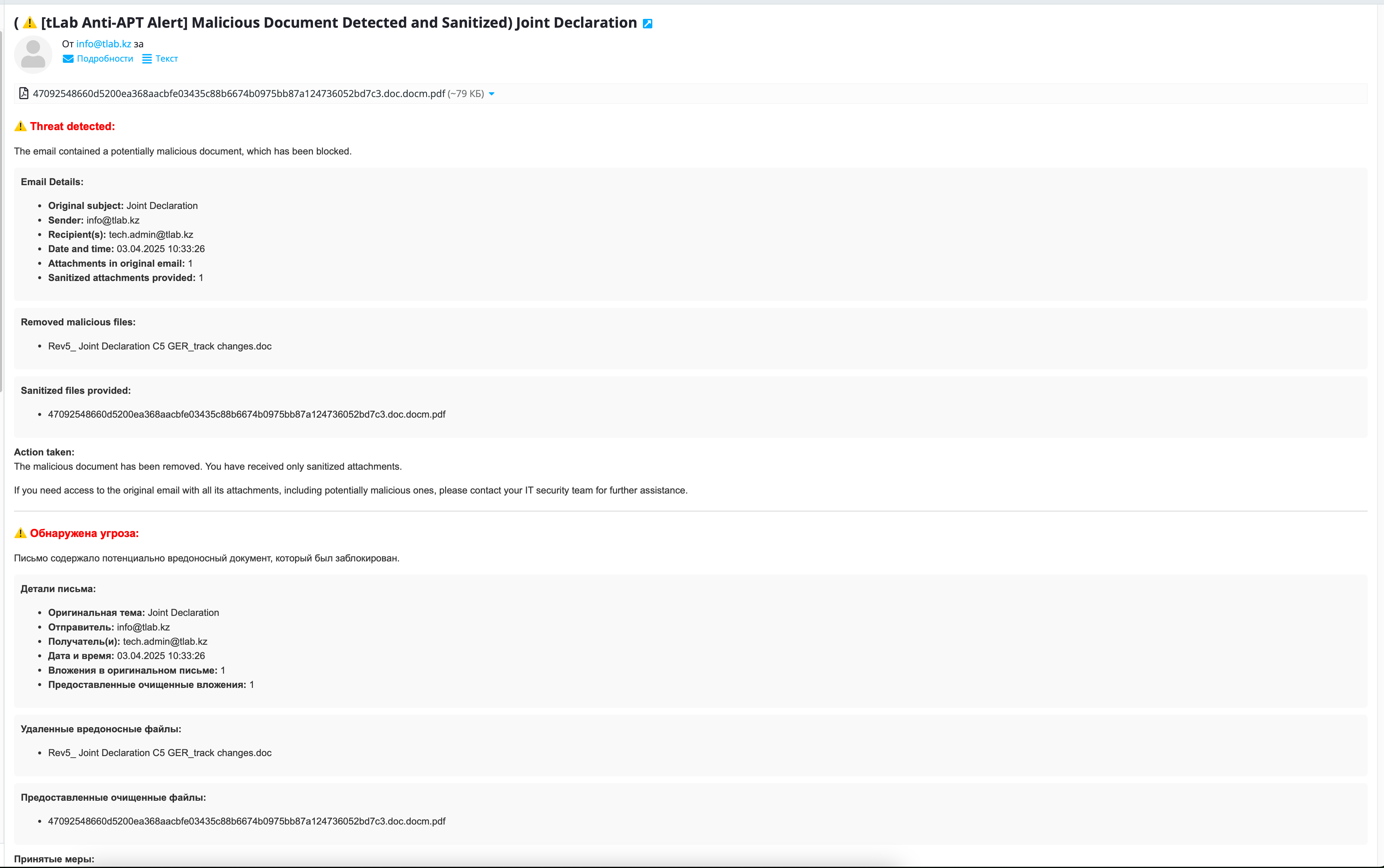
The tLab Anti-APT CDR module integrates with tLab Mail (MTA) to enhance email security through a streamlined technical process. Incoming emails with document attachments are intercepted by tLab Mail, which extracts the attachments and forwards them to the tLab Sandbox for analysis. The tLab Sandbox employs multiple modules to assess the attachments for threats, utilizing both static and behavioral analysis techniques. If the attachment is identified as legitimate, tLab Mail delivers the email to the recipient unchanged; if malicious content is detected, the CDR module sanitizes the document by removing harmful elements, and tLab Mail delivers the sanitized version with a notification indicating the original file’s malicious nature, ensuring secure access to a safe document.
Roadmap: Integration with tLab Browser Extension
The planned integration with the tLab Browser Extension aims to extend CDR protection to browser-based file downloads. The extension intercepts files downloaded through the browser and transmits them to the tLab Sandbox for threat analysis using established analysis modules. If the file is deemed safe, it is downloaded as is; if malicious elements are detected, the CDR module sanitizes the file, and the sanitized version is downloaded to the user’s device with an accompanying alert about the original file’s threat level, ensuring a secure browsing experience.